I Reverse-Engineered UPPCL's API Because I Was Tired of Guessing My Electricity Balance
How I built a self-hosted analytics dashboard for UPPCL SMART prepaid meters - cracking encrypted APIs, running on a Raspberry Pi Zero 2, and finally answering 'will my balance last till Friday?'
"How much balance do I have left?" - Me, every night, opening the UPPCL SMART app, squinting at a number with no context whatsoever.
The Problem
I have a UPPCL SMART prepaid electricity meter. For the uninitiated - it's a prepaid meter installed by UPPCL (Uttar Pradesh Power Corporation Limited) across UP, running on Jio's infrastructure. You recharge it like a phone. When it hits zero, your power cuts off.
The official app shows you a balance. That's it.
No trend. No forecast. No "hey, at your current consumption rate you'll run out in 3 days." Just a number. A lonely, contextless number sitting there while you try to mentally calculate whether ₹800 is enough to survive the weekend with the AC running.
I wanted to know:
- Will my balance last till Friday?
- Did yesterday's spike come from the AC or was it a slab crossing?
- What's my real per-unit rate after FPPA, duty, and subsidy?
- How long did my last ₹2,000 recharge actually last?
- Which day of the week do we use the most power?
- What's the status of that 1912 complaint I filed last week?
The app answers none of these. So I did what any reasonable engineer does - I opened Wireshark and started sniffing traffic.
Down the Rabbit Hole: Reverse Engineering the API
The UPPCL SMART app talks to uppcl.sem.jio.com. Simple enough. Except it wasn't.
Layer 1: ALTCHA Proof-of-Work
Every request is gated behind an ALTCHA challenge - a proof-of-work mechanism where the client has to compute a SHA-256 hash that satisfies a difficulty target before the server will respond. It's designed to slow down automated scraping. I implemented a solver that brute-forces the nonce in Python in under 10ms before every request batch.
Layer 2: RSA-OAEP + AES-256-GCM Envelope Encryption
The request payload isn't plain JSON. It's wrapped in a two-layer encryption envelope:
- A random AES-256-GCM session key encrypts the actual payload
- That session key is then encrypted with the server's RSA-OAEP public key
- Both are bundled together and sent as a single encrypted blob
The response comes back the same way - AES-256-GCM encrypted, with the IV prepended. Every. Single. Request.
One quirk that cost me a day: UPPCL's JWT is sent in a token HTTP header - not Authorization. HAR capture tools sanitize auth headers by default, so it looked like nothing was being sent at all. Once I spotted it in raw Wireshark output, the rest fell into place.
Layer 3: 60-Day JWT Auth
Login returns a JWT that expires every 60 days. Fine - but the login flow itself goes through the encryption pipeline above, so you can't even authenticate without cracking layers 1 and 2 first.
Bonus Boss: Appsavy (the 1912 Complaint Portal)
UPPCL uses a separate backend - appsavy.com - for the 1912 electricity complaint portal. I reverse-engineered this one too, because complaint history is genuinely useful (live status, JE/AE/XEN officer chain, expected resolution time).
Appsavy has encryption too. Five encrypted request headers. I was expecting something comparable to the UPPCL SMART setup.
It was AES-CBC-128. With the key hardcoded as "8080808080808080". And the IV also hardcoded as "8080808080808080". Literally the same 16-byte string for both. Baked into the app's JavaScript.
I don't know what to say. Someone worked very hard on the encryption and then did that. It's in the codebase, it works, and I will not question it further.
Once I had both APIs working, everything opened up. 23 endpoints from UPPCL SMART, plus the Appsavy complaint endpoints - daily consumption, monthly bills, recharge history, balance queries, live complaint status - all structured, all ready to visualize.
Building the Dashboard
The architecture is deliberately simple:
┌──────────────────┐  plain JSON  ┌──────────────────────┐  encrypted  ┌──────────────┐
│ Next.js Dashboard│◄────────────►│ FastAPI Proxy (:8000) │◄───────────►│ UPPCL / Jio  │
│      (:3000)     │              │ • ALTCHA solver       │             └──────────────┘
└──────────────────┘              │ • RSA-OAEP + AES-GCM  │  encrypted  ┌──────────────┐
                                  │ • JWT caching         │◄───────────►│ Appsavy      │
┌──────────────────┐  plain JSON  │ • Tenant discovery    │             │ (1912 CRM)   │
│  Swagger / curl  │◄────────────►│                       │             └──────────────┘
└──────────────────┘              └──────────────────────┘
The proxy on :8000 handles all the crypto ugliness. You talk to it in plain JSON. It does the ALTCHA + RSA-OAEP + AES-GCM dance on every upstream call, transparently. Your credentials never leave your machine - the proxy only caches the 60-day JWT locally.
The dashboard on :3000 is Next.js 16 with Tailwind v4, SWR, and a full command palette (⌘K). Dark-first, keyboard-driven (page shortcuts: g h/u/b/r/m/c/s), with custom SVG charts - no Recharts or Tremor, every viz is hand-built to pack maximum information density.
The proxy also exposes a full OpenAPI 3.1 schema - all 23 endpoints browsable at /docs (Swagger UI) and /redoc (ReDoc) without touching the dashboard. Useful if you want to pipe the data into Home Assistant or Grafana yourself.
The Dashboard Pages
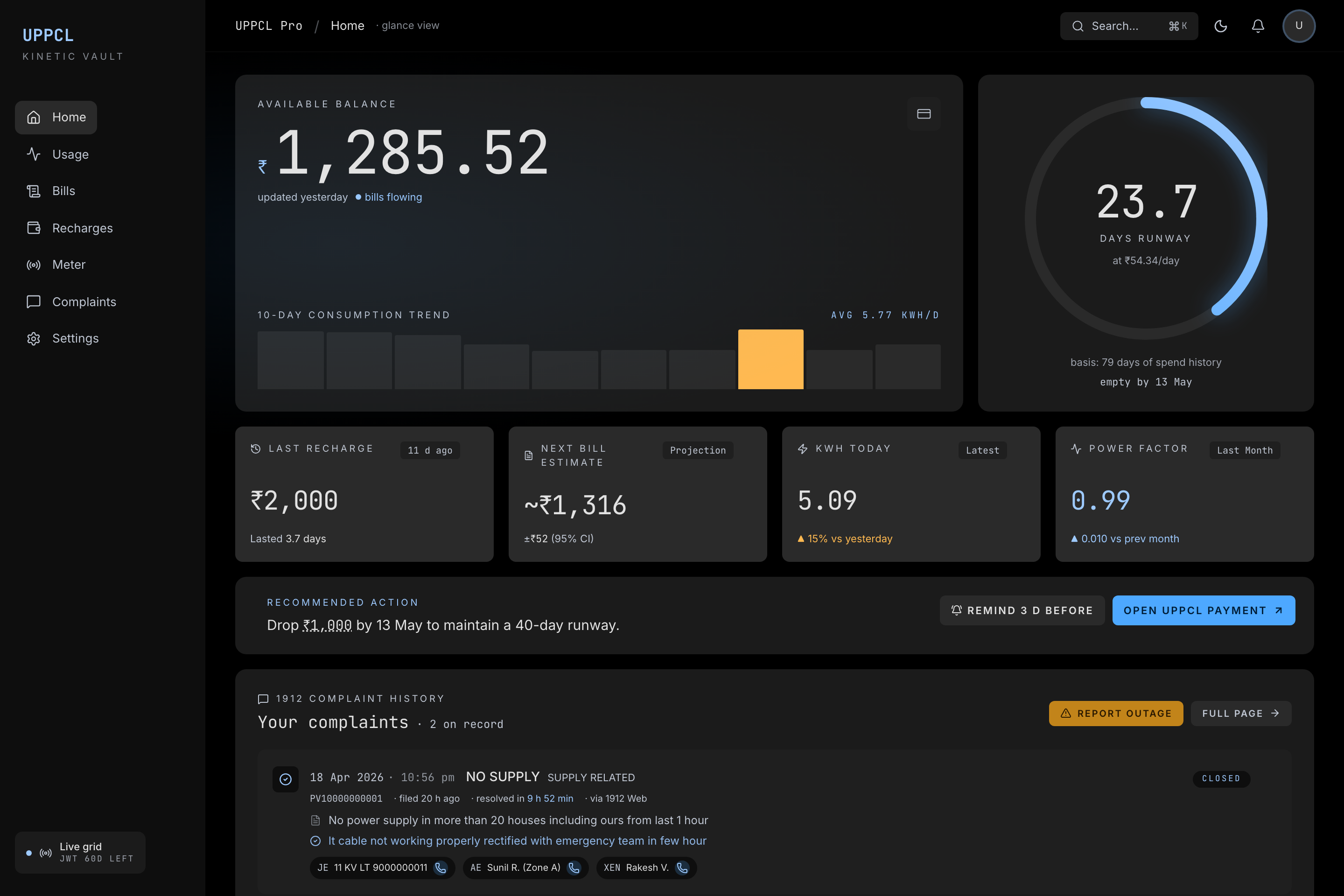
Home - Live Balance + Runway
UPPCL Pro - home dashboard
The balance shown is never a guess. The proxy runs a three-step fallback: live meter query → latest daily bill → billing-system outstanding. Each source is tagged so you always know how fresh the number is.
The runway forecast is a fitness-ring gauge showing how many days your balance will last at your current burn rate, with an ETA date. This is the one thing I always wanted from the official app and never got.
Analytics - Consumption Patterns
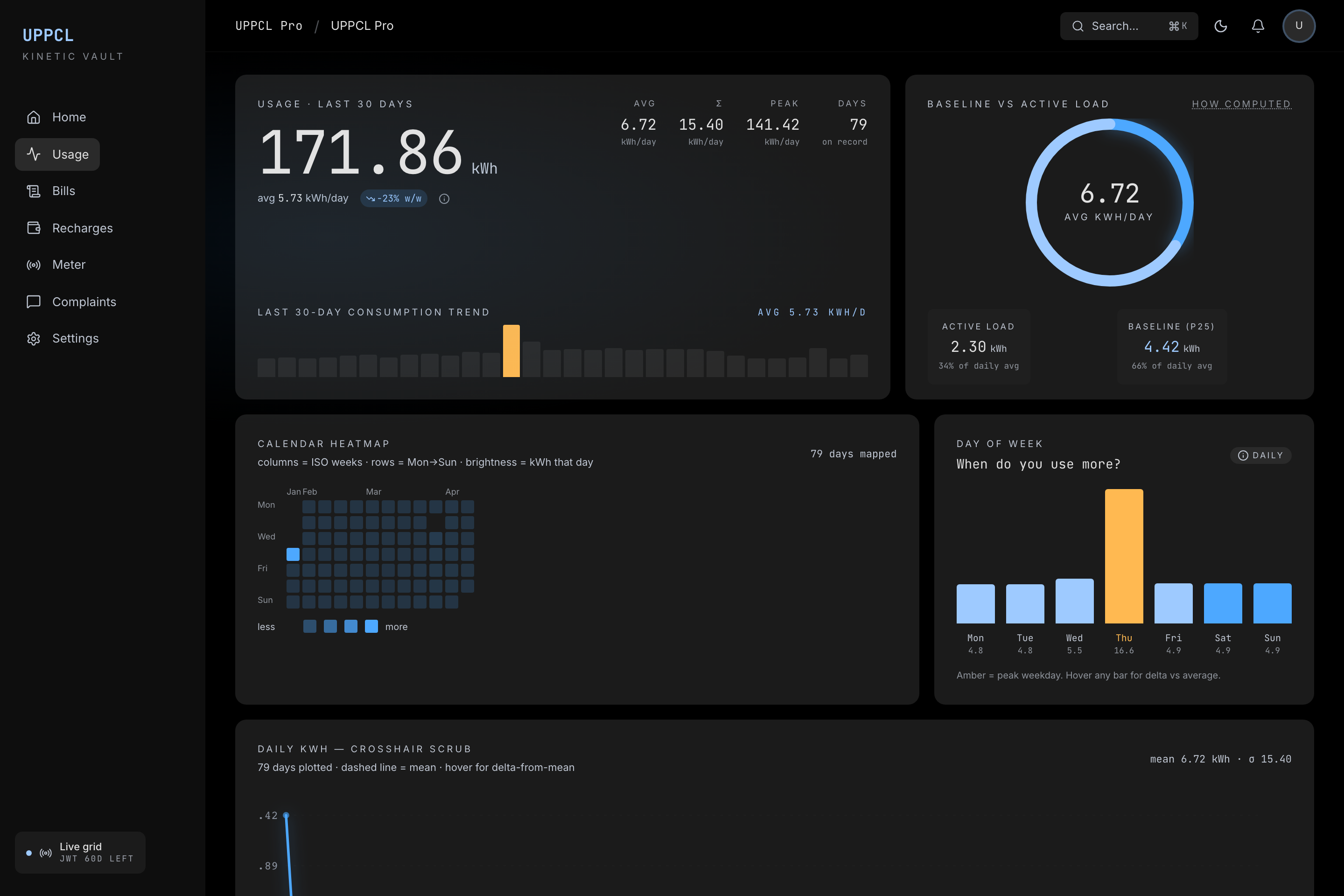 UPPCL Pro - analytics
A full year of daily consumption as a GitHub-style calendar heatmap. Day-of-week pattern bars answer "which day do we use the most power?" without needing hourly data (UPPCL only emits daily totals).
Anomaly detection flags days where consumption is more than 1.5σ above your 30-day rolling average, with a side panel explaining the math. Great for catching the day you left the geyser running.
Bills & Cost Ledger
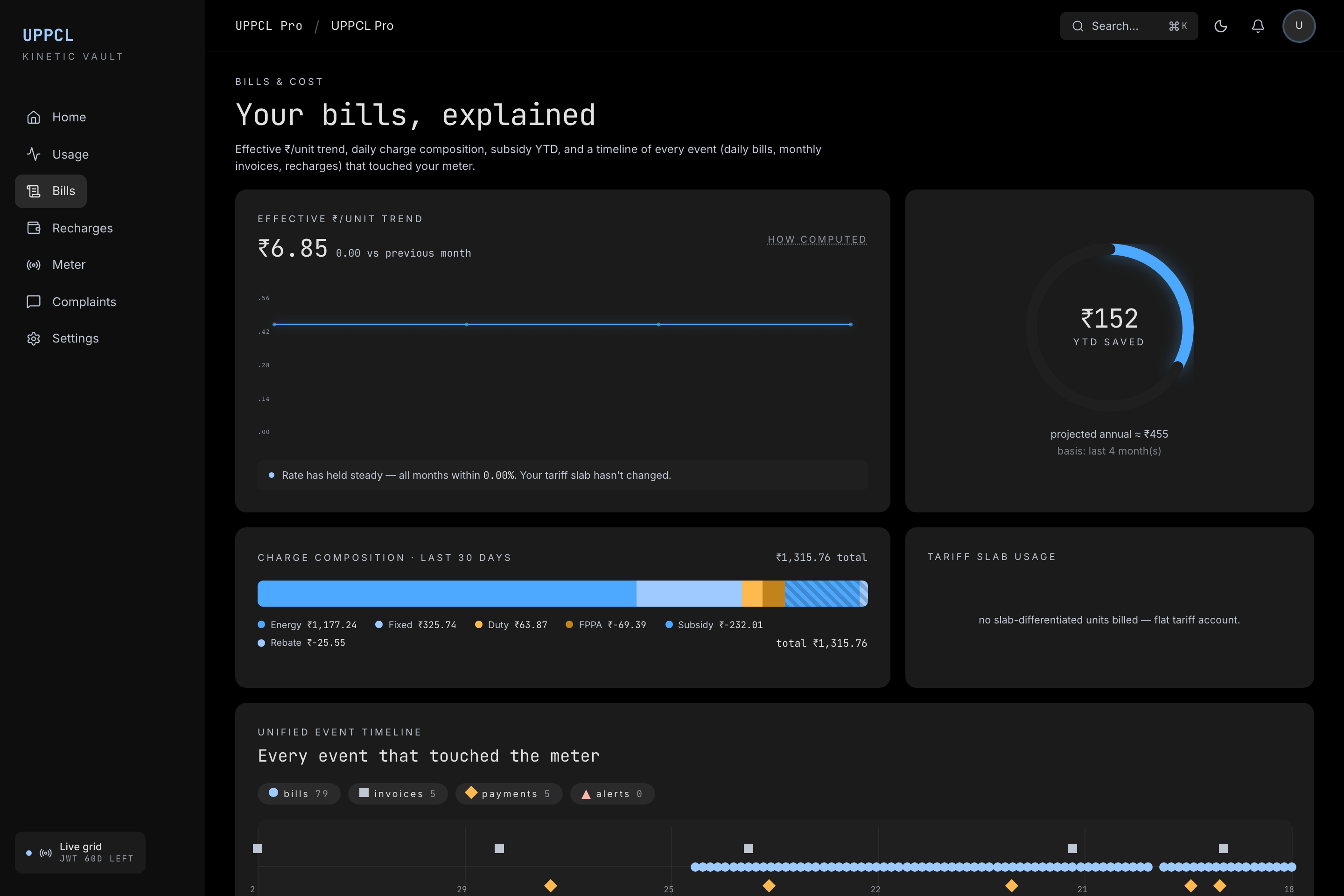 UPPCL Pro - bills and cost ledger
Effective ₹/unit trend over time, stacked charge composition (energy / fixed / duty / FPPA / subsidy / rebate), tariff slab usage, subsidy YTD. A unified event timeline puts every daily bill, monthly invoice, and recharge on a single filterable axis - click any event to drill in.
Recharges & Runway Planner
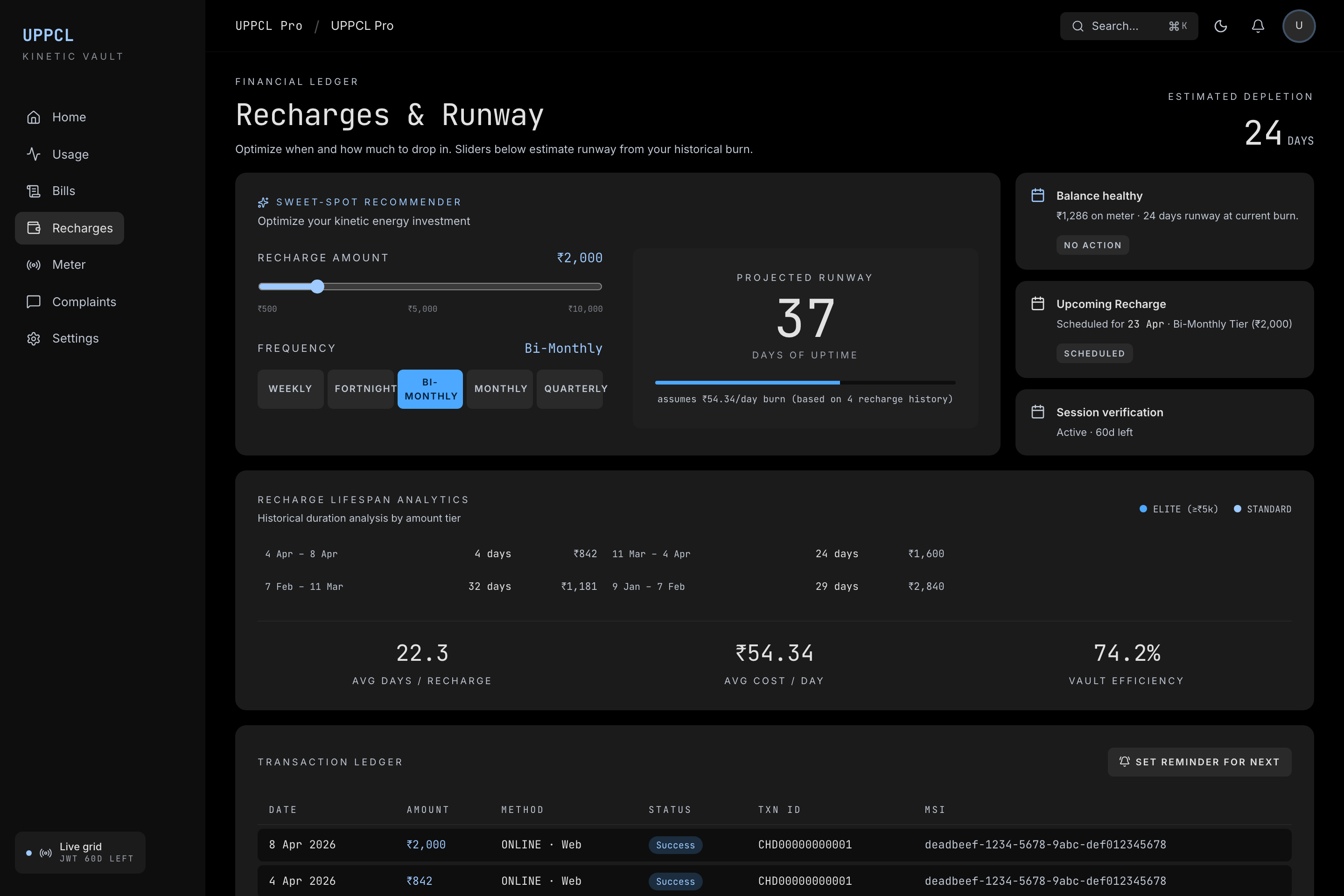 UPPCL Pro - recharges and runway planner
Full recharge history with lifespan analytics (how long did each recharge actually last vs. what you paid). The recharge sweet-spot recommender uses interactive sliders to suggest the optimal amount and frequency to hit a target runway based on your historical consumption.
Meter Health
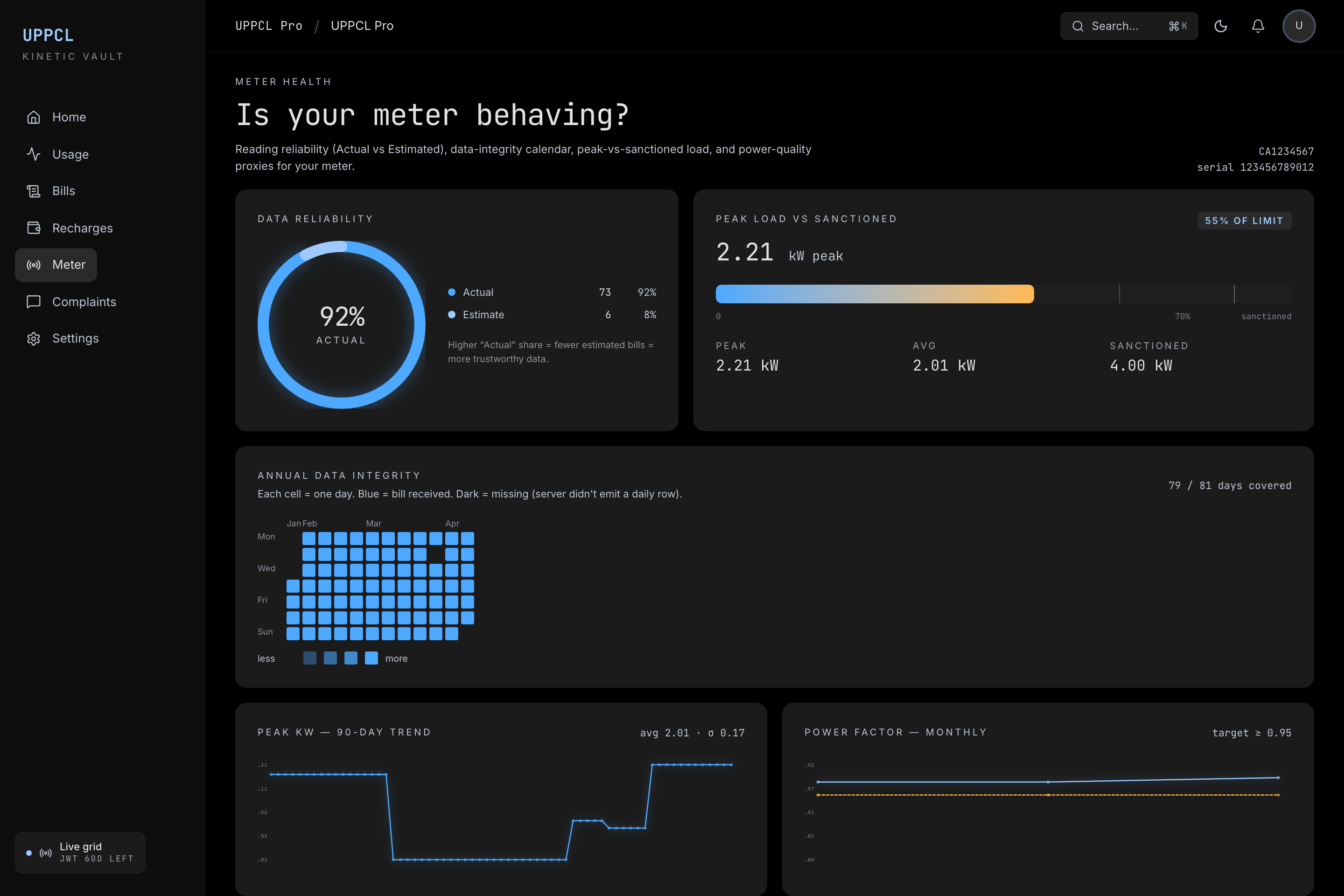 UPPCL Pro - meter health
Reading reliability donut (Actual vs. Estimated reads), a 365-day data-gap calendar, peak-vs-sanctioned-load gauge, and power-factor trend. Useful for spotting if your meter has been flagging estimated reads for months without a physical inspection.
1912 Complaint History
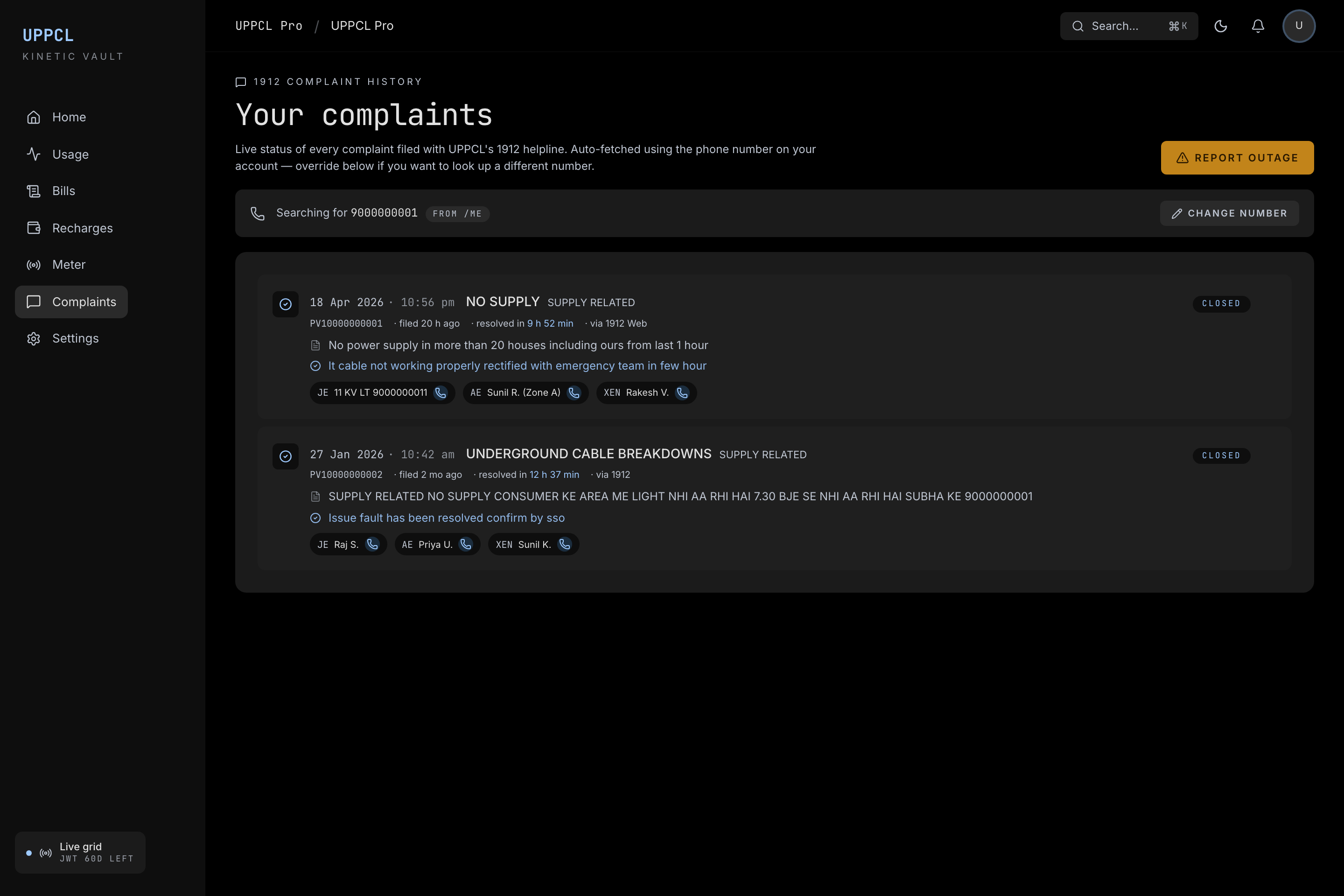 UPPCL Pro - complaint history
Live status of every complaint filed from your phone - full JE/AE/XEN officer chain, expected resolution timeline, closing remarks. One-tap call buttons for each officer. A one-click "Report outage" side panel pre-fills the complaint text so filing a new complaint takes 10 seconds.
Privacy & Security
Nothing runs in the cloud. Everything is on your machine (or your Pi). No telemetry, no phoning home, no accounts.
Your username and password are sent only to UPPCL's own login endpoint over HTTPS. The proxy never logs them. After login, only the 60-day JWT is cached locally in uppcl_session.json - that file is gitignored. If you ever leak it, change your UPPCL password and re-login.
Running on a Raspberry Pi Zero 2
The whole stack - FastAPI proxy + Next.js dashboard - runs comfortably on a Raspberry Pi Zero 2 W. 512 MB RAM, ~$15 board, always-on.
The catch: the Next.js build would OOM on a Zero. Solution: build the static output once on your laptop, rsync it to the Pi. The Pi runs only the Python proxy + Caddy serving static files. Caddy binds to :1912 (UPPCL's own helpline number - hard to forget).
# one command from your laptop ships everything
make pi-deploy PI=pi@<pi-ip>

# then open http://<pi-ip>:1912/
Expected resource usage: ~60 MB RAM for the proxy + ~40 MB Caddy, ~3% CPU idle. Total power draw: under 1W.
If you're also running Pi-hole on the same device, one line gives you http://uppcl.lan:1912/:
sudo pihole-FTL --config dns.hosts '[ "<pi-ip> uppcl.lan" ]'Zero Hardcoded Values
There is nothing hardcoded per user in this project. No connectionId, no deviceId, no tenantId. Everything is discovered at runtime via the /site/search endpoint using your credentials.
This means all five UPPCL DISCOMs should work in theory:
| DISCOM | Region | Status |
|---|---|---|
| PVVNL | West UP (Ghaziabad, Noida, Meerut) | ✅ Tested end-to-end |
| MVVNL | Central UP (Lucknow, Kannauj) | 🟡 Same API, needs verification |
| PuVVNL | East UP (Varanasi, Gorakhpur) | 🟡 Same API, needs verification |
| DVVNL | South UP (Agra, Jhansi) | 🟡 Same API, needs verification |
| KESCo | Kanpur city | 🟡 Same API, needs verification |
I've opened GitHub issues for each unverified DISCOM. If you're on any of them, clone the repo, log in, and drop a comment with your results. No code needed - just run make dev and tell me if /balance and /dashboard return real data.
What's Next
- Low balance push notifications via ntfy or Telegram
- One-click complaint submission (already reverse-engineered, gated behind a confirm to avoid accidental real complaints)
- Home Assistant integration - expose balance and consumption as HA sensors
- Multi-connection portfolio view for landlords managing multiple meters
- PWA + widgets for iOS and Android
Try It
The project is open source under MIT: github.com/Harry-kp/uppcl-pro
Setup is three commands:
git clone https://github.com/Harry-kp/uppcl-pro.git
cd uppcl-pro
make setup && make dev
Then log in once:
curl -X POST localhost:8000/auth/login \
  -H 'content-type: application/json' \
  -d '{"username":"<your UPPCL username>","password":"<your password>"}'
Open http://localhost:3000 and your meter data is there.
If you have a UPPCL SMART prepaid meter and have been squinting at that balance number wondering what it actually means - this is for you.

Written by
Harshit Chaudhary
Senior Software Engineer at BrowserStack, building AI accessibility agents covering 40+ WCAG criteria across web, mobile, and design, and owning their reliability: evals, rollouts, Kafka, Kubernetes. Building AI accessibility agents at BrowserStack.